


Blender 5.2 Introduces a New Era of Cloth and Fur/Hair Simulation with XPBD Physics

Updated: Aug 12
Blender 5.2 • Cloth, Fur, Hair Simulation • Advanced Level

With the release of Blender 5.2 LTS, Blender introduces one of its most ambitious updates for procedural animation and visual effects workflows: a completely new simulation framework dedicated to cloth and hair dynamics.
Built around the XPBD (Extended Position-Based Dynamics) solver, this new system aims to provide artists with a more stable, flexible, and production-oriented approach to physical simulations. Rather than simply replacing the existing cloth workflow, Blender 5.2 introduces a new foundation designed to connect simulation, procedural workflows, and Geometry Nodes into a much more unified ecosystem.
This evolution represents an important step for Blender, especially for artists working on character animation, VFX, and procedural content creation, where secondary motion such as clothing, hair, and soft materials plays a crucial role in achieving believable results.
A New Foundation for Cloth and Hair Simulation
Simulation has always been a challenging area in 3D production. While modern tools can generate impressive results, achieving a balance between realism, control, and performance often requires complex setups and a strong technical understanding.
Blender 5.2 approaches this challenge differently by introducing a simulation system based on XPBD. This technology focuses on providing more stable physical behavior while keeping the workflow accessible for artists.
The most interesting aspect of this update is that simulation is no longer treated as a separate feature isolated from Blender’s procedural tools. Instead, it becomes deeply connected to Geometry Nodes, allowing artists to move seamlessly between simple artist-friendly setups and more advanced technical configurations.
This creates a workflow where a character artist can quickly create dynamic motion, while technical artists can extend and customize the system to match specific production requirements.
A More Accessible Cloth Workflow
One of the main improvements of Blender 5.2 is how quickly a cloth simulation can be created.
The new system keeps familiar concepts that artists already understand, such as pinned areas, collision objects, and material properties, but simplifies the overall experience. Defining which parts of a mesh should remain attached and which areas should be simulated becomes much more straightforward.
For character workflows, this opens interesting possibilities. Accessories, clothing parts, and secondary elements can now be prepared for simulation without requiring extremely complex setups.
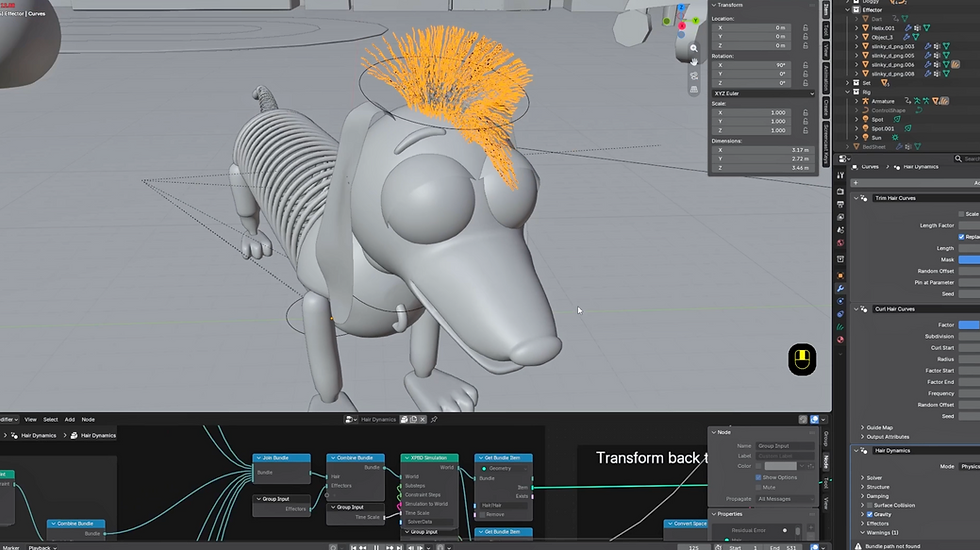
A simple example such as a character accessory attached to the head already demonstrates the potential of this system. By defining an anchor area and allowing the remaining geometry to simulate, artists can quickly create natural movement while maintaining artistic control.
The system also introduces new ways to control the physical behavior of materials. Parameters such as stretchiness and bendiness allow artists to define whether an object should behave more like a rigid material, a soft fabric, or something in between.
This makes the simulation less about finding the "correct" physical values and more about achieving the desired artistic result.
A More Flexible Approach to Collisions
Collision handling is another area where Blender 5.2 brings important improvements.
Instead of simply adding collision behavior object by object, the new system introduces the concept of Effectors, allowing artists to define which objects should influence a simulation.
This approach makes larger scenes easier to manage. A complete environment, a character, or multiple interacting objects can become part of the simulation ecosystem through collections or more advanced Geometry Nodes setups. For animation workflows, this is particularly valuable because simulations can now respond naturally to moving characters and animated objects.
A cloth element no longer exists independently; it can follow the movement of a character, interact with the environment, and react dynamically throughout an animation.
Geometry Nodes: Where the System Really Becomes Powerful
While the simplified modifier workflow makes the new system accessible, the deeper potential comes from its integration with Geometry Nodes.
Behind the scenes, Blender’s new cloth and hair simulations are driven by procedural node systems. This means technical artists are not limited to predefined parameters; they can access the underlying logic and create customized simulation tools.
This separation between a simple interface and a fully procedural backend is one of the strongest aspects of the new workflow.
Artists can use the default setup for quick results, while studios and technical directors can build more advanced systems tailored to their pipeline.
Through Geometry Nodes, simulations can be combined with custom colliders, procedural controls, and additional logic. A studio could, for example, create its own specialized cloth tool where artists control simulation behavior through a simplified interface designed specifically for their needs.
Custom Forces and Procedural Control
Another major advantage of the Geometry Nodes approach is the ability to integrate custom forces directly into simulations.
Instead of relying only on predefined physics behavior, artists can introduce additional influences that affect how materials move.
This opens the door to more artistic and procedural effects, such as directional wind, controlled impacts, or custom environmental interactions.
Because these forces are part of the procedural system, they can also be connected to other elements of the scene, making simulations more dynamic and adaptable.
This is where Blender’s philosophy becomes particularly interesting: simulation is not just something that happens after modeling and animation, but something that can become part of a larger procedural creation process.

Hair Simulation Built on the Same Technology
The new simulation framework is not limited to cloth. Blender 5.2 also introduces a new approach for dynamic hair based on the same XPBD technology.
This is especially interesting because cloth and hair often need to work together in character production. A hairstyle needs to react to movement, collisions, and external forces in the same way clothing does.
By sharing the same simulation foundation, Blender creates a more consistent workflow between different types of secondary motion.
Creating dynamic hair becomes much more accessible. Artists can work with curves, generate hairstyles, and enable simulation while still benefiting from the same systems used for cloth, including collisions, effectors, and procedural customization.
A Strong Step Forward for Character Workflows
For character artists and animators, this update could have a significant impact.
Secondary motion has always been one of the most time-consuming parts of production. Creating believable cloth movement, hair dynamics, and soft material reactions often requires either extensive manual animation or complex simulation setups.
Blender 5.2 brings these elements closer together by providing a more unified workflow.
The combination of XPBD simulation, Geometry Nodes, procedural tools, and curve-based hair creates a foundation that feels much closer to modern production pipelines.
It allows artists to start with simple setups and gradually move toward highly customized solutions without changing tools or workflows.
A New Direction for Blender Simulation
Blender 5.2 LTS is more than an update to cloth and hair. It represents a broader shift toward a more integrated simulation ecosystem.
The real strength of this system is not only the quality of the final simulation, but the flexibility behind it. Beginners can quickly create dynamic results, while experienced artists can explore deeper procedural workflows and build their own tools.
With XPBD at its core and Geometry Nodes as its foundation, Blender 5.2 establishes a powerful new direction for procedural animation and visual effects.
For artists working with characters, environments, and simulations, this update opens the door to faster iteration, more control, and a much more connected creative process.
Interested in Control Rig & Fur in Unreal Engine 5.8? Learn here : https://www.projprod.com/control-rig-fur


Comments