


Wafer 3D Texture Painting App Is Now Available on Windows

Updated: Apr 29
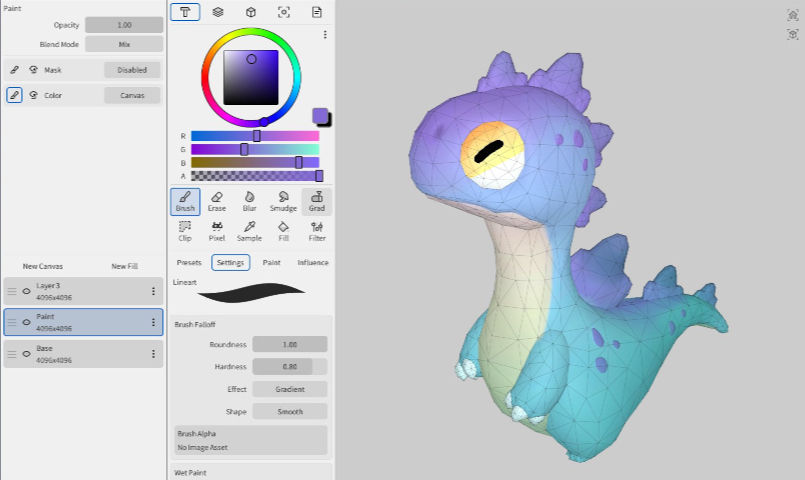
The 3D texturing landscape is evolving fast and a new contender is starting to get serious attention.
Wafer, a stylized-focused 3D texture painting app developed by Sparseal, is now officially available on Windows, expanding beyond its original mobile platform.
From iPad to Desktop: A Strategic Shift
Wafer was initially released on iPad, designed as a touch-first, performance-driven painting tool. Its goal was simple: make 3D texturing feel as intuitive and fluid as digital painting apps like Procreate.
Now, with the Windows version, Wafer is clearly moving toward a more professional and production-ready workflow.
This transition opens the door for artists who want:
a fast iteration tool
a lightweight alternative to heavier software
a more artistic, less technical approach to texturing
What Makes Wafer Different?
Unlike industry standards such as Substance 3D Painter, Wafer is not trying to replicate a full AAA PBR pipeline.
Instead, it focuses on Stylized & Hand-Painted Workflows Wafer is clearly built for:
stylized games
indie projects
animation assets
NPR (non-photorealistic rendering)
This makes it especially relevant in today’s market, where stylized visuals are booming.
Key Features
Even in its current state, Wafer already includes powerful tools:
Real-time 3D painting on models (OBJ, FBX, GLB)
Multi-channel painting (color, roughness, metallic simultaneously)
Layer-based workflow with masks and blending modes
Optimized performance, inherited from its mobile-first design
The result is a very responsive and fluid painting experience, even on modest setups.
Why It Matters (Market Insight)
We’re seeing a clear shift in the 3D industry:
--> Less complexity --> Faster workflows --> More artist-friendly tools
Wafer fits perfectly into this trend.
It’s similar to what Nomad Sculpt did for digital sculpting:
making high-quality 3D tools more accessible, faster, and more intuitive.
Watch Wafer in Action
Here’s a great walkthrough to see how it works in practice:
Current Limitations
Wafer is promising, but still evolving:
Currently in beta on Windows
Not as feature-complete as high-end texturing tools
Limited for advanced photorealistic pipelines
For now, it works best as:
✔️ a stylized production tool
✔️ a fast iteration companion
✔️ a creative exploration tool
Final Thoughts
Wafer isn’t just another 3D app, it represents a broader evolution in creative tools.
If Sparseal continues in this direction, Wafer could become the “Procreate of 3D texturing”
For artists working in stylized pipelines, Blender, or real-time engines like Unreal, this is definitely a tool to keep an eye on!


Comments